Dynamic Access
TRASAGATE's dynamic access feature allows you to automatically create services and access maps when users attempt to access resources that are not yet defined in the system. This powerful functionality streamlines the process of onboarding new services and users, reducing administrative overhead and improving the user experience.
Benefits of Dynamic Access
Dynamic access provides several key benefits for organizations:
Simplified Service Onboarding: With dynamic access enabled, TRASAGATE automatically creates a new service profile when a user attempts to access a resource that is not yet defined in the system. This eliminates the need for manual service creation and reduces the administrative burden of managing services.
Seamless User Experience: Users can access new resources without waiting for administrators to manually create service profiles and access maps. This improves the user experience and ensures that users can be productive from day one.
Scalability and Flexibility: Dynamic access allows TRASAGATE to quickly adapt to changes in your IT environment, automatically accommodating new services and users as they are introduced. This scalability and flexibility are essential for organizations with rapidly evolving infrastructures.
Consistent Access Control: By automatically applying predefined access policies and user group assignments to dynamically created services, TRASAGATE ensures that access control remains consistent and aligned with your organization's security requirements.
Configuring Dynamic Access
To enable dynamic access in TRASAGATE:
- Navigate to the Services page in your TRASAGATE dashboard.
- Click on the "Settings" tab.
- Locate the "Dynamic Access" section.
- Enable the dynamic access feature by checking the status checkbox.
- Select the user group and access policy that will be automatically applied to dynamically created services.
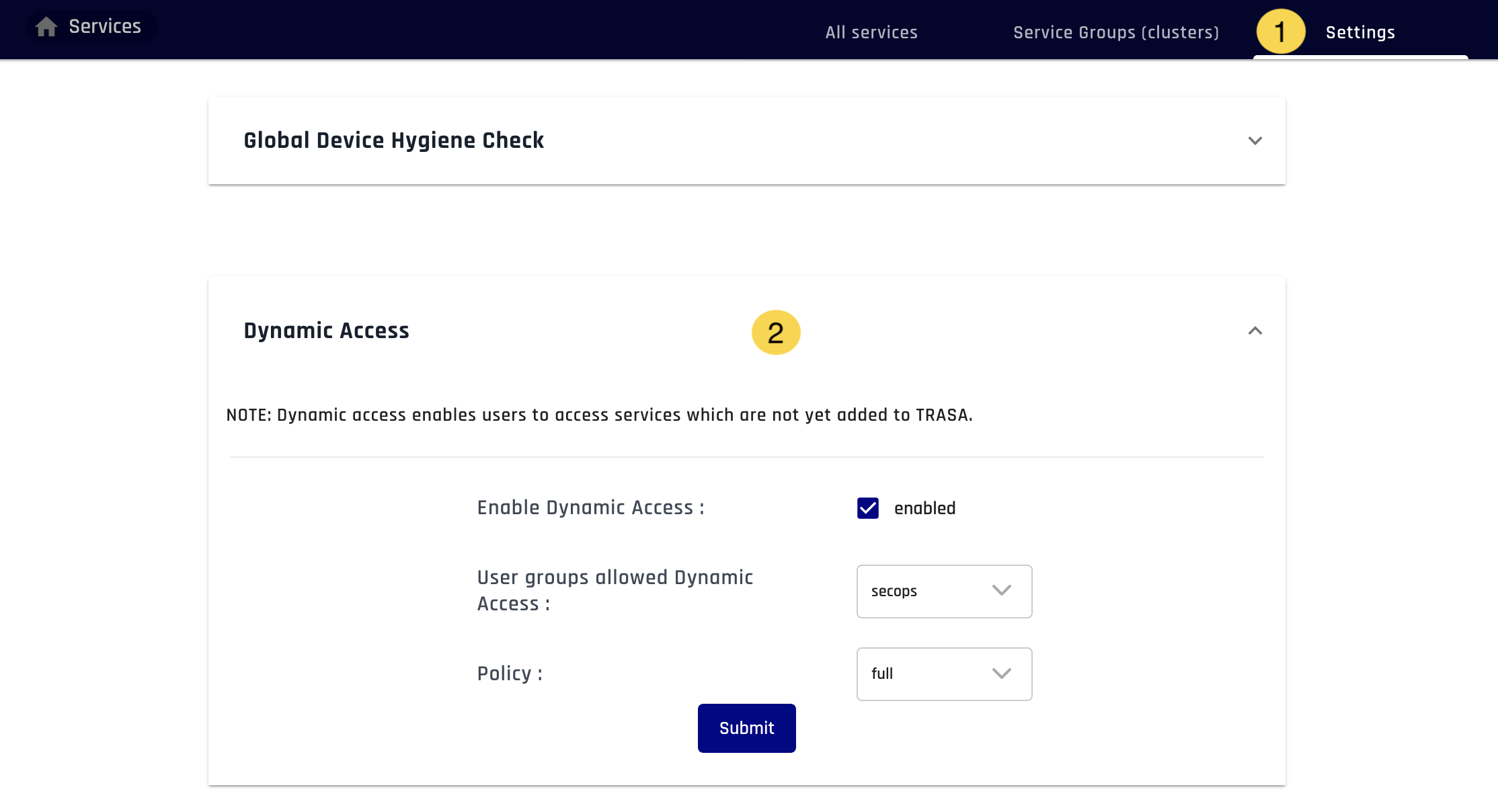
Once dynamic access is enabled, TRASAGATE will automatically create a new service and assign the specified user group and access policy whenever a user attempts to access an IP or hostname that is not yet associated with an existing service.
Considerations and Best Practices
While dynamic access offers significant benefits, it is important to consider the following best practices when implementing this feature:
Carefully Define Access Policies: Ensure that the access policies applied to dynamically created services align with your organization's security requirements and the principle of least privilege. Regularly review and update these policies to maintain a strong security posture.
Monitor and Audit Dynamic Access: Regularly review the services and access maps created through dynamic access to ensure that they adhere to your organization's security and compliance guidelines. TRASAGATE's logging and auditing features can help you maintain visibility into dynamically created services and access maps.
Implement Naming Conventions: Consider implementing naming conventions for dynamically created services to make them easily identifiable and manageable. This can help administrators quickly distinguish between manually created and dynamically created services.
By leveraging TRASAGATE's dynamic access functionality and following these best practices, organizations can streamline service onboarding, improve the user experience, and maintain a strong security posture in the face of evolving IT environments.