Welcome to TRASAGATE Documentation
Before diving in, let’s answer the most important question:
What is TRASAGATE?
TRASAGATE is a zero trust service access platform developed by TechInnoHub. It stands out by bundling a wide array of access control features into a single, cohesive platform, enabling you to implement zero trust access control strategies within your infrastructure.
Key Features:
- Layer 7 Protocol, User Identity, and Privilege-Aware Access Proxy: TRASAGATE operates at Layer 7, providing deep awareness of protocols, user identities, and privileges.
- Enforcement of Security Policies: Apply security policies (time-based, file transfers, location, context, 2FA) to SSH, RDP, web, and database access.
- Device Security Hygiene Enforcement: Ensure access policies are based on the security status of user devices.
- Integrated Two-Factor Authentication: Protect SSH, RDP, and hardware console access with native two-factor authentication integration.
If you're familiar with using a bastion server for jump access or centralized access to internal infrastructure, think of TRASAGATE as a bastion server on steroids!
How is it Different from Existing Access Control Solutions?
To better understand how TRASAGATE and zero trust systems differ from traditional access control products, refer to the image below, which contrasts legacy vs. zero trust access control systems:
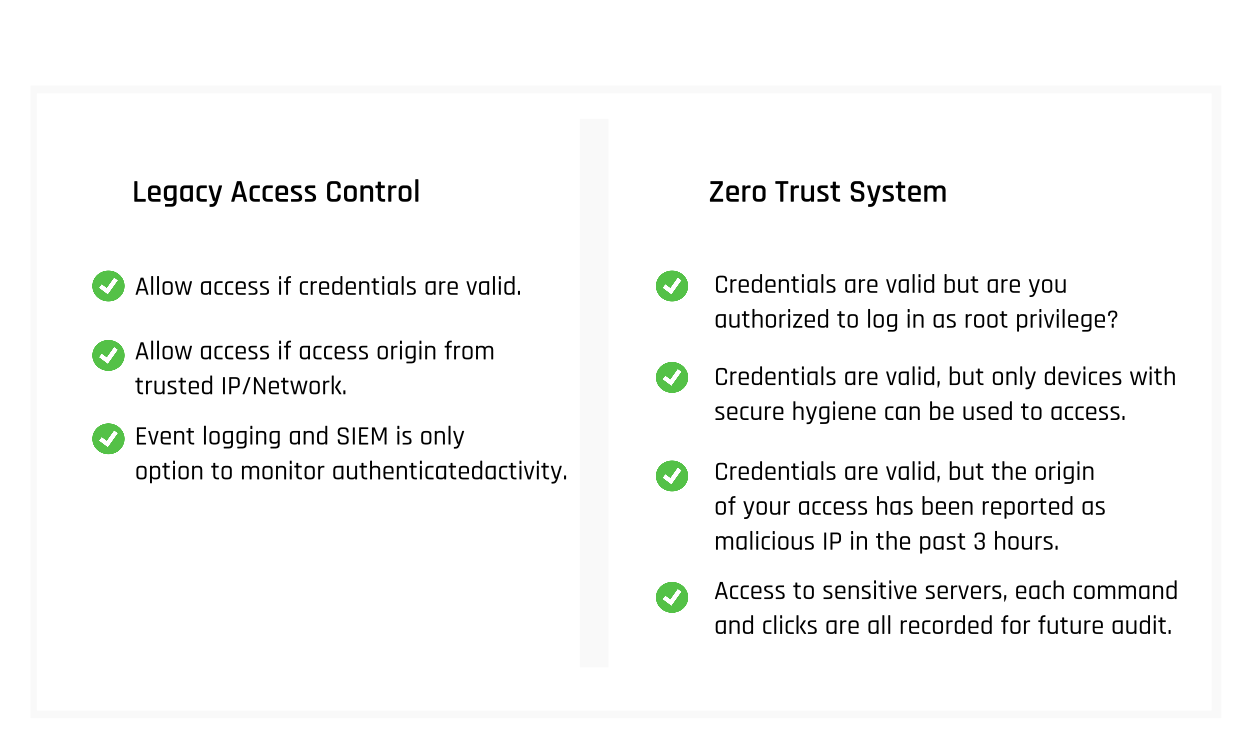
TRASAGATE Access Proxy serves as a significant upgrade for your existing bastion or jump server. Whether you're using a Linux server configured as a jump server or a Microsoft Remote Desktop Gateway, TRASAGATE offers enhanced features and best practices that are enabled and configurable by default.
Immediate Use Cases and Benefits
TRASAGATE Server as an Access Point (Bastion/Jump Server) for Your Internal Infrastructure
The Access Proxy is a reverse proxy that understands RDP, SSH, HTTP, and Database protocols, making forwarding decisions based on access policies.
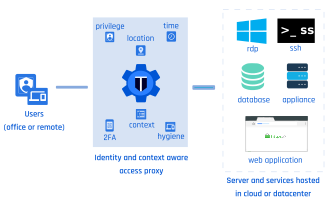
Adopting Best Practice Security for Remote Access (SSH, RDP, Web, Database)
- Centralized Authorization: Streamline authorization for remote access.
- Policy Enforcement: Apply and enforce security policies for remote access.
- Two-Factor Authentication: Easily add two-factor authentication to secure remote access.
- SSH Certificate Authentication: Implement SSH certificate-based authentication across all SSH access points.